Quoted, invoiced and paid, straight from the job
Plumber, electrician, builder, joiner or any other UK trade? Debbie sends quotes and invoices from your phone, keeps every job and customer in one place, logs your miles between jobs and tracks your CIS deductions. Then your bank statement does the rest, so you can see roughly what you owe and file your own tax return with confidence.
Self Assessment for tradespeople in three steps
What you actually do in Debbie. The screens are real screens from the app.
-
1
Quote the job, then invoice it
A quote is a customer and one job cost. Add materials only if you want to itemise them. The customer accepts or declines from a link and an accepted quote becomes the job by itself, with the price and every line carried over.
Take a deposit once the quote is accepted if you like. When the work is done, invoice the balance with the deposit shown and credited. Record the payment in a couple of taps and the customer gets an emailed receipt.
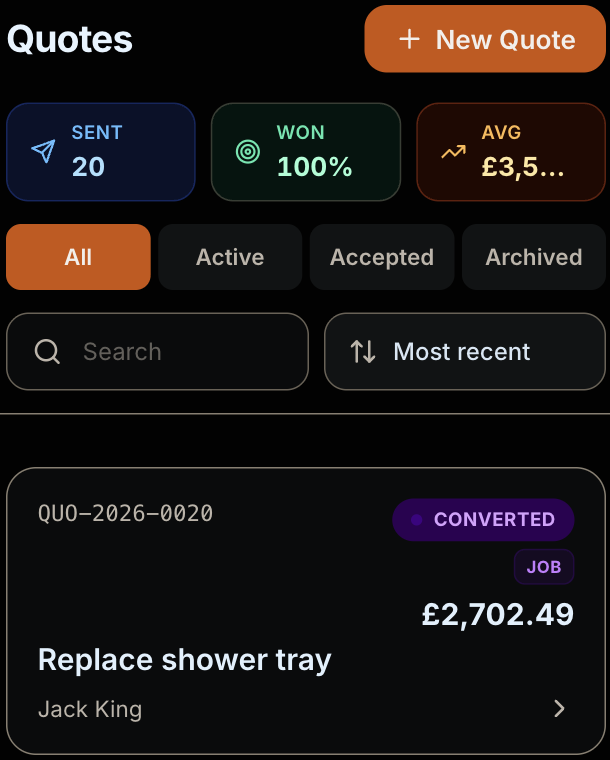
A real screen from a test account with made up customers. -
2
Log your miles between jobs
Add your van once, then log each trip to a job or a supplier. Debbie claims your business miles at HMRC's rate and shows how much of the 10,000 mile band you have used this tax year.
The Quotes, Jobs and Invoices tabs sit right next to Mileage in your Work tab, in the order the money flows.
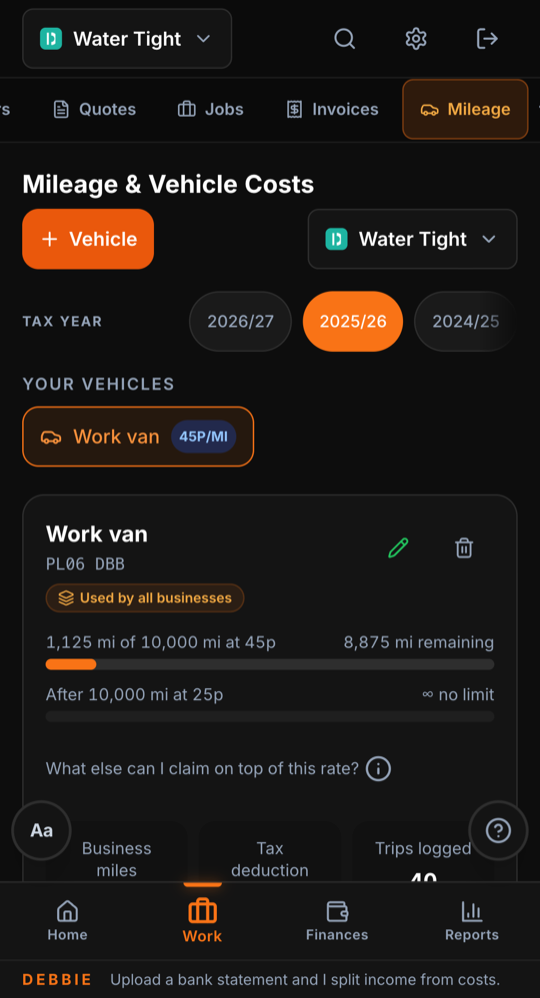
A real screen from a test account. It shows the 2025/26 tax year, when the rate was 45p. From 6 April 2026 it is 55p. -
3
Upload your bank statement and see your Tax Return page
Export a statement from your banking app as a PDF, CSV, OFX or QIF and drop it into Debbie. It sorts each payment into money in, costs or personal, then asks you about the few it is not sure of.
Your money in, costs and miles come together as one profit figure, the figure you pay tax on, with your tax estimate underneath. Download your Tax Return Pack to file it yourself or hand it to whoever files for you.
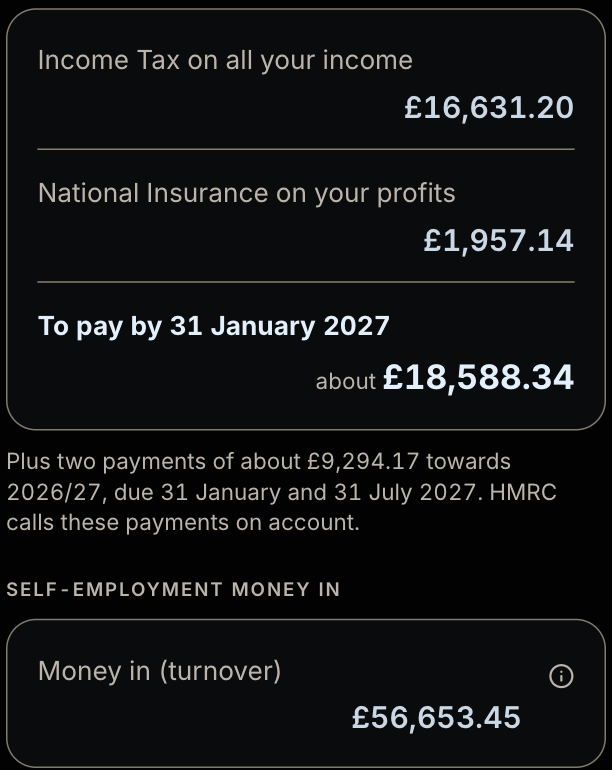
A real screen from a test account, 2025/26 tax year.
Receipts and materials, counted once
Snap a Screwfix or Toolstation receipt and Debbie reads the merchant, the date, the VAT and every line on it.
Every line on the receipt is remembered. Start typing a material on a quote or a job and the unused receipt lines appear first, with the merchant and the price you paid. Put one on a job and it links back to the receipt, so the cost is counted once.
Pricing a job? Snap a receipt from the quote screen and the items land on the estimate without being saved as an expense, because a price is not a purchase. Bought something for yourself on the same receipt? Mark that item as personal and only the business part is claimed.
Need to know how many tiles, how much paint or how many bricks? The free materials calculator works it out with no account needed.
CIS deductions, taken off your bill
Working for a contractor under the Construction Industry Scheme? They take 20% from the labour part of your invoice if you are registered for CIS and 30% if you are not. Those deductions are not an extra tax. They count as advance payments towards your tax and National Insurance. GOV.UK: what you must do as a CIS subcontractor.
Debbie records your CIS status and UTR so the tax already taken is offset against your bill and shown on its own line of your tax estimate. Paying a helper or subcontractor yourself? Record who did the hours on a job and what you paid them as a labour cost, matched to your bank so it is counted once.
For example, a £1,000 labour invoice paid with 20% taken under CIS puts £800 in your bank. The other £200 has already gone to HMRC towards your bill.
Mileage between jobs: where your miles start and stop
From 6 April 2026 a car or van claims 55p a mile for the first 10,000 business miles in the tax year, then 25p. GOV.UK: simplified expenses for vehicles.
Work from home and go out to customers? You can claim from your front door to each job and back home again. Trips from home just to buy materials for a job count too. A place you go to in a regular pattern, like the same site every week for months, counts as commuting.
Work from a workshop, yard or shop? Home to your premises is commuting, so it doesn't count. Start counting when you leave your premises for a job, a supplier or the bank.
Only whole business trips count. If you stop for something personal, leave that part out. Debbie shows the rule that fits your trade when you log a trip. GOV.UK: travel expenses if you're self-employed.
Your van, tools and equipment
Record a van, a big tool or other equipment and Debbie counts the full cost in the tax year you paid for it, as the cash basis allows. A car goes through capital allowances instead. A van is claimed either by the mile or by its real running costs, never both, so Debbie asks which when you add it. GOV.UK: office, property and equipment expenses.
Making Tax Digital? Most people do not need it yet
Making Tax Digital only starts once your self employment and property money in, added together before costs, is over £50,000 from April 2026, £30,000 from April 2027 and £20,000 from April 2028. GOV.UK: check if Making Tax Digital applies to you.
-
Until then nothing changes for you. Keep sending invoices and snapping receipts, see your tax estimate and download your Tax Return Pack to file it yourself or have someone file it for you.
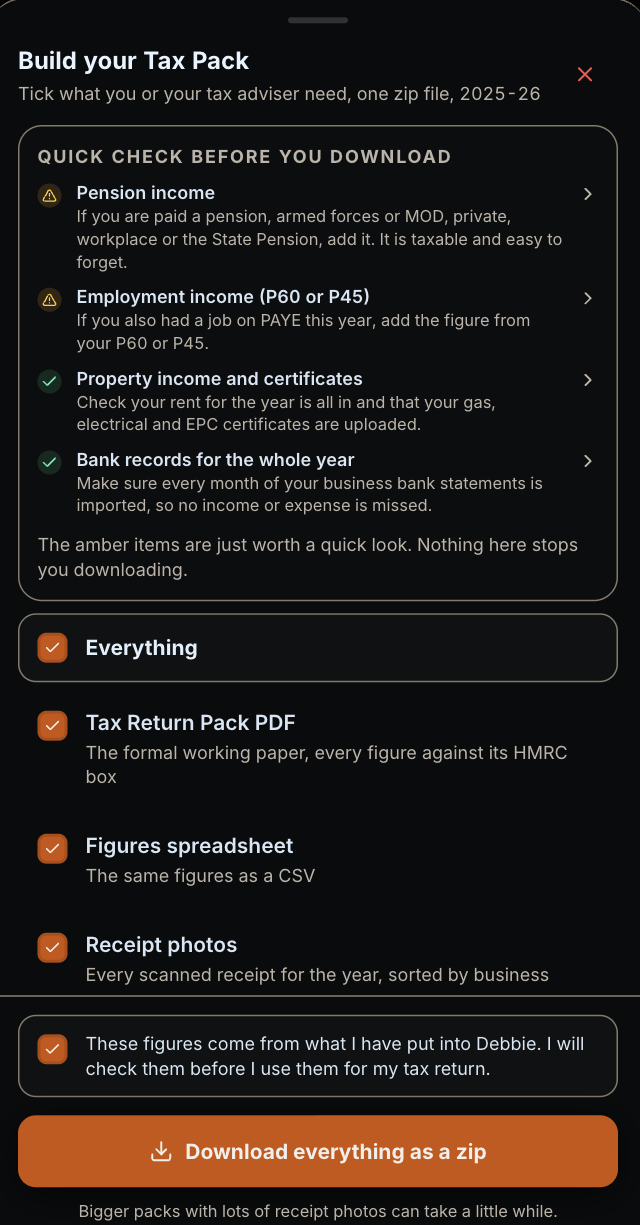
A real screen from the app. -
If it does apply, Debbie connects to HMRC and sends your quarterly updates for you, only after you check the figures and tap to confirm.
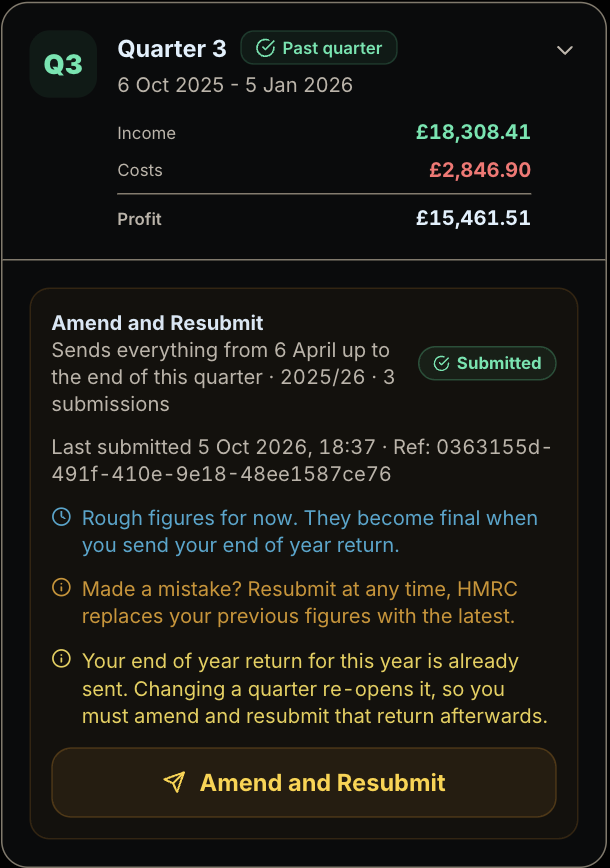
A real quarterly update screen from a test account, 2025/26 tax year.
Tradespeople tax questions
My contractor takes 20% under CIS. Do I get it back?
CIS deductions are not an extra tax. They count as advance payments towards your Income Tax and National Insurance. On your Self Assessment return the deductions come off your bill. If more was taken than you owe for the year, HMRC pays back the difference. A contractor takes 20% if you are registered for CIS and 30% if you are not, from the labour part of your invoice only, not from materials you paid for or VAT. GOV.UK: what you must do as a CIS subcontractor.
Can I claim my tools and equipment?
Yes, if you bought them for the business. Most sole traders use the cash basis, where tools and equipment usually come off your profit in the tax year you pay for them. A car is the exception, it goes through capital allowances instead. If you use traditional accounting you claim capital allowances on equipment. If you use the £1,000 trading allowance you cannot claim these costs as well. GOV.UK: office, property and equipment expenses and GOV.UK: cash basis.
Can I claim the miles in my van from home to each job?
Usually yes, if you work from home and go out to different customers. HMRC treats home as your base, so the drive from your front door to each job and back home again counts. A site you go to in a regular pattern, like the same site every week for months, counts as commuting. If you work from a workshop, yard or shop, the drive from home to there is commuting. From 6 April 2026 a car or van claims 55p a mile for the first 10,000 business miles in the tax year, then 25p. The mileage rate covers fuel, insurance and repairs, so you do not claim those as well. GOV.UK: travel expenses if you're self-employed and GOV.UK: simplified expenses for vehicles.
I do my quotes and paperwork at home. Can I claim for that?
If you work 25 hours or more a month from home, HMRC's flat rate lets you take £10 a month off your profit for 25 to 50 hours, £18 for 51 to 100 hours and £26 for 101 hours or more. The flat rate does not include your phone or internet, so you can claim the business part of those bills separately. GOV.UK: simplified expenses for working from home.
When do I need to register as self-employed?
If your trading income for the tax year (6 April to 5 April) is over £1,000, you need to register for Self Assessment by 5 October after the end of the tax year you started. Working for a contractor in construction? Register for CIS as well. If you do not, contractors must take 30% from your pay instead of 20%. GOV.UK: register for Self Assessment and GOV.UK: what you must do as a CIS subcontractor.
Paying for a job app and a tax app? See how Debbie's £10 a month compares.
Compare Debbie with Tradify, Xero and QuickBooks →See every feature Debbie has, for trades and everyone else, on the full feature list.
See the full feature list →Start your free month
Your first month is free, no card needed. Add a card only if you decide to stay.
Start your free monthHome · Materials calculator · All questions · Tax for drivers